Kernl 0.4.0: Projects With Approval, Voice, and Agents That Resume
Offices now work per project and publish nothing without your approval. Plus local voice for talking to the Chief, IMAP and WhatsApp from the interface, runs that resume after a restart, and eight security fixes.
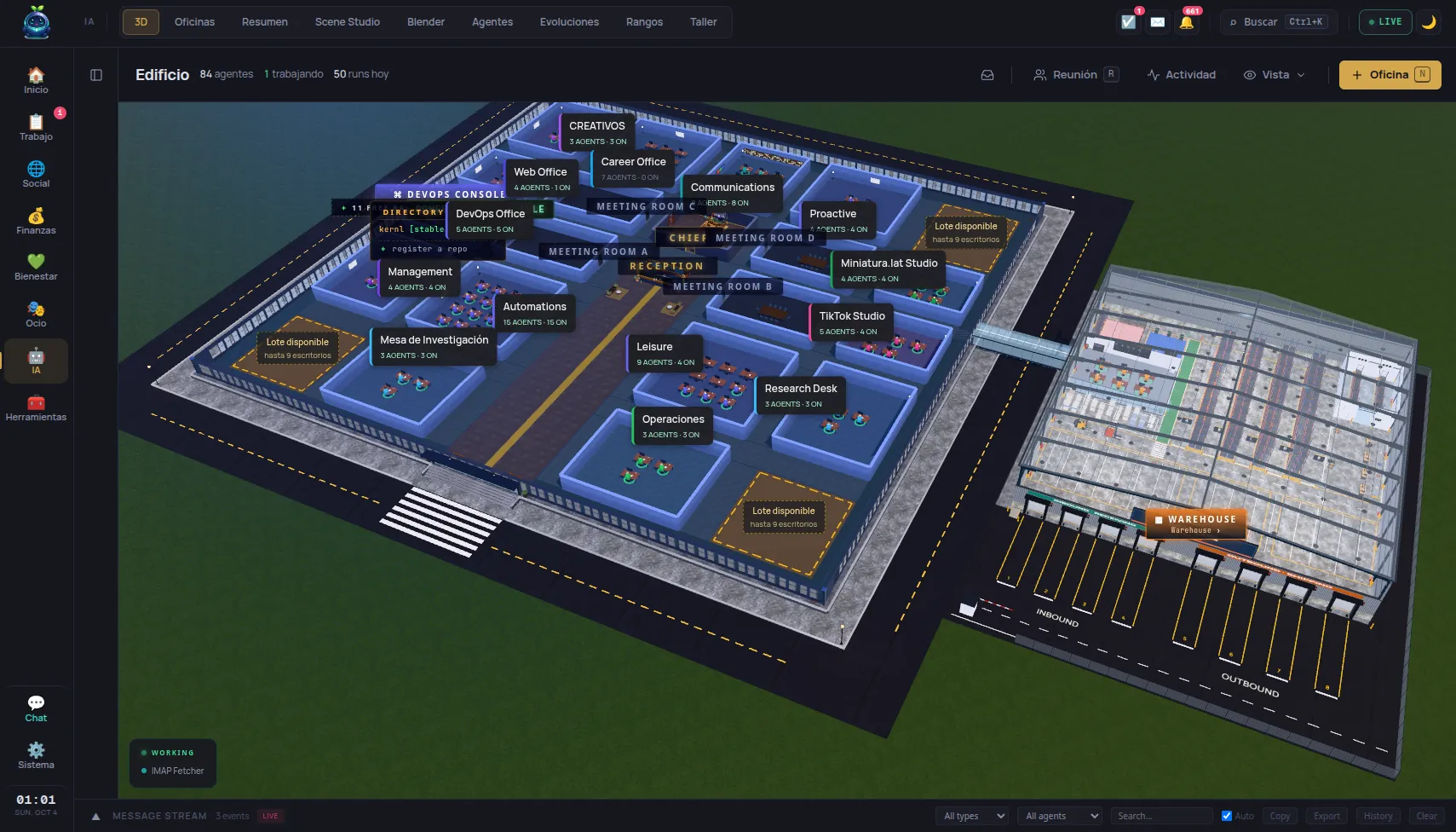
Kernl 0.4.0 is the largest version so far. The structural change: an office stops being a single thing and starts working per project, and nothing the agents write goes out until you approve it.
Projects: nothing goes out without your approval
An office used to be just an office. Now it can serve several products or businesses, and runs, memory, learnings, letters and schedules belong to a project.
The change that really matters is a different one. In a project run, tools that publish or send something write a draft to an outbox instead of sending it. Nothing goes out until you approve it. Only then does it leave by email, newsletter, WhatsApp or LinkedIn, respecting do-not-contact flags and unsubscribe links. Pending approvals show on the Work overview.
That’s the difference between an agent that drafts something for you and an agent that writes to your customers while you aren’t looking.
Talking to the Chief
There’s a microphone button in the chat and in the Chief’s channel, with spoken replies you can switch on, plus voice notes on Telegram.
What makes it interesting is that the default engines are local and free: whisper.cpp to listen, Piper to speak. Prefer the cloud and speech recognition can run on Groq or OpenAI, with the voice on OpenAI or ElevenLabs. The Spanish Piper voice is about 110 MB and downloads itself the first time it’s used.
Mail and WhatsApp, from the interface
You connect a mailbox from Settings or the setup wizard: it detects the provider from the address, tests IMAP and SMTP before saving, and walks you through app passwords where the provider needs them. Messages appear in the mail view with HTML bodies rendered and remote images blocked, and Gmail accounts split into Primary, Updates, Promotions, Social and Forums.
WhatsApp links with a QR code or a phone code, and the session survives updates, so you aren’t asked to scan the QR again on every one.
Runs that pick up where they stopped
A run cut off by a restart continues from where it was. Tool calls whose result was lost are never repeated: the agent is told their outcome is unknown, which is the honest answer and avoids sending the same email twice.
Automatic resumes are capped (KERNEL_AGENT_RESUME_WINDOW_MS, KERNEL_AGENT_MAX_AUTO_RESUMES), so a run that crashes the kernel cannot crash it on every boot.
The 3D world
The dashboard opens straight into the world, with an Offices tab beside it listing each one with its status. New offices are built on fixed lots: creating, growing or deleting one never moves another, and free lots show a “Lot available” sign you can click to open the wizard. Create an office while the world is open and you watch it go up — a crew raises the walls, then the agents arrive at their desks.
Extensions can contribute their own building to the world. In the screenshot above, the Warehouse on the right is exactly that.
Eight security fixes
The ones that carry the most weight:
- A workspace tool took the caller’s office from an argument. An explicit
flow_idoverrode the caller’s identity, so any agent could reach another office’s private workspaces. - Forge credentials were stored in plaintext (GitHub, GitLab, Gitea), GitHub App private keys included. They’re encrypted now.
POST /api/comms/inboundfailed open: with no token configured it accepted any email. It now answers 503 until you set one.- Twitter/X keys, tokens and cookies were sent to the dashboard in every account listing.
- The Docker sandbox failed open: an invalid egress allowlist silently left the network open. Sandboxed processes also no longer inherit the kernel’s environment and secrets.
What will break when you upgrade
This is the part worth reading before, not after:
- Without
TIMEZONE, the kernel uses the machine’s timezone, not UTC. It moves more than “today”: scheduled agents run at that local time. One set to0 8 * * *ran at 08:00 UTC and now runs at 08:00 yours. SetTIMEZONE=UTCto keep the old behaviour. - Reminder and event times given without a zone are local time.
2026-03-01T09:00meant nothing definite before; it is now 09:00 in yourTIMEZONE. - Set
KERNEL_ENCRYPTION_KEYbefore upgrading if you use GitHub, GitLab or Gitea connections, and keep it. Losing it afterwards makes those tokens unreadable. - Issues is gone: the page, its tab, its extension and the
kernel_issues_*tools are out of the core. Synced issues stay in the database, but nothing reads them. - The Docker stack starts the realtime engine and the WhatsApp bridge by default, so a plain
docker compose upnow pulls two more images.
How to upgrade
curl -fsSL https://lifekernl.com/install.sh | sh
The same command installs and updates. On macOS and Windows the update runs from the app, with the “Update now” button. Full detail is in the CHANGELOG, and rpm, deb, dmg and msi binaries are on the release page.