@matware/e2e-runner 1.1.0: Real-Time Dashboard, Issue-to-Test, and Screenshot Hashes
The biggest release yet for our JSON-driven E2E test runner. A full web dashboard, automatic bug verification from GitHub issues, screenshot hashes for AI debugging, and much more.
Version 1.1.0 of @matware/e2e-runner is out. It’s the biggest update since the initial release — a real-time web dashboard, automatic bug verification from GitHub/GitLab issues, and screenshot hashes that bridge visual output to AI debugging. Everything remains JSON-driven, zero-config by default.
Real-Time Web Dashboard
The headline feature. A complete dark-themed SPA that gives you full visibility and control over your test runs — no extra setup required.
npx @matware/e2e-runner dashboard
Open http://localhost:8484 and you’re in.
Live Execution
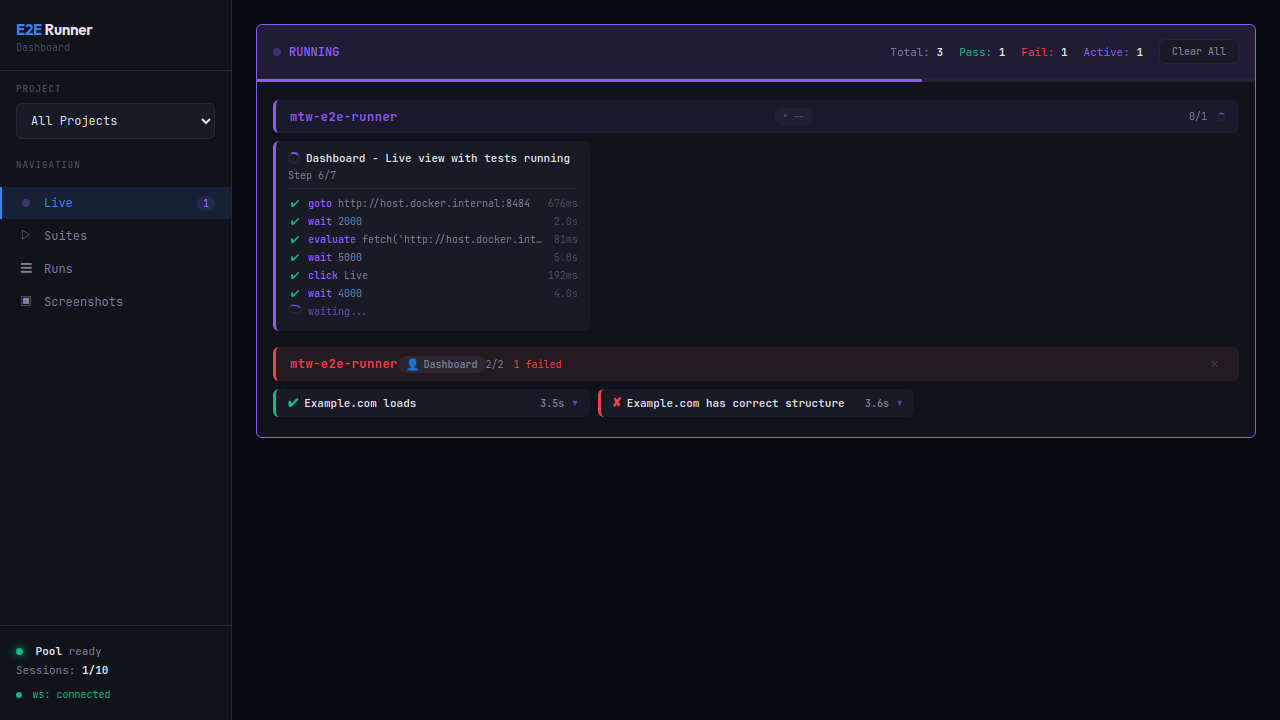
Watch tests run in real time. Every action — goto, wait, click, evaluate — streams via WebSocket with individual durations. Pass/fail counters update live.
Live view during test execution: steps stream in real time with individual durations, pass/fail counters update instantly.
Test Suites
All your test suites organized by project. Click “Run Suite” on any card or “Run All Tests” to execute everything.
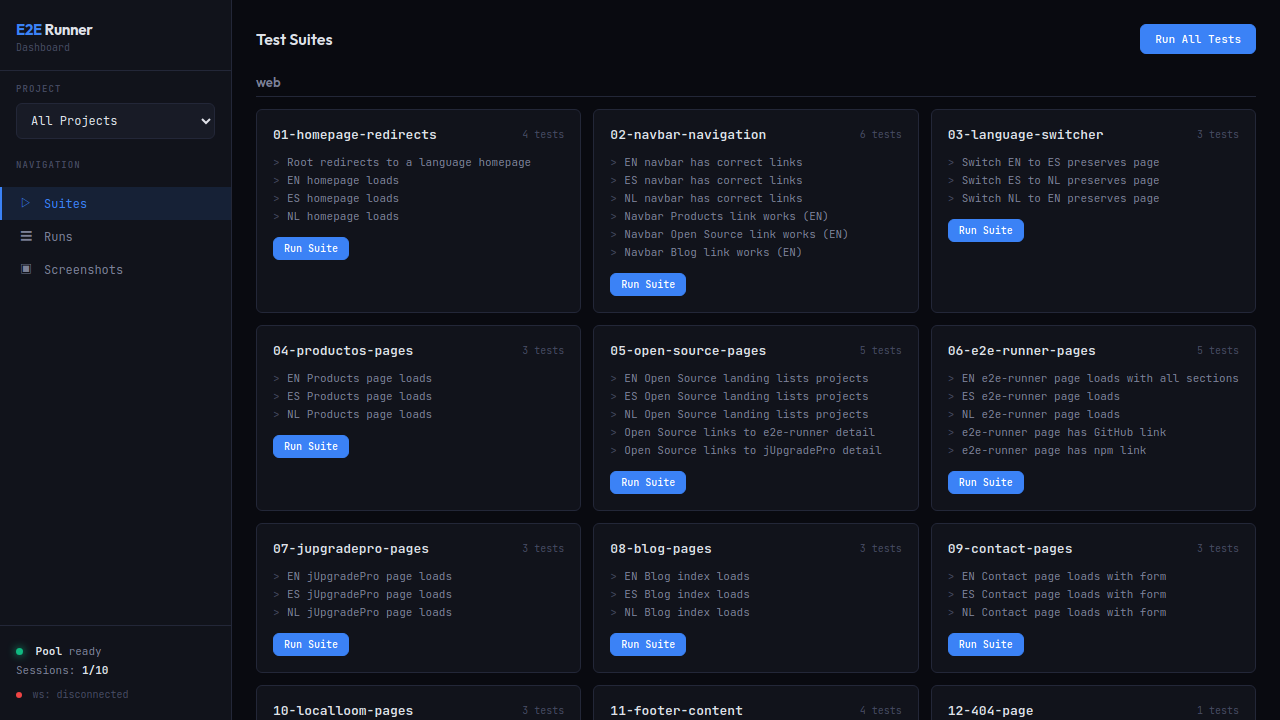 Suites view: cards organized by project, each with a one-click Run Suite button.
Run History with Trends
A pass rate trend chart and a detailed table of all runs across projects. Color-coded percentages make it easy to spot regressions.
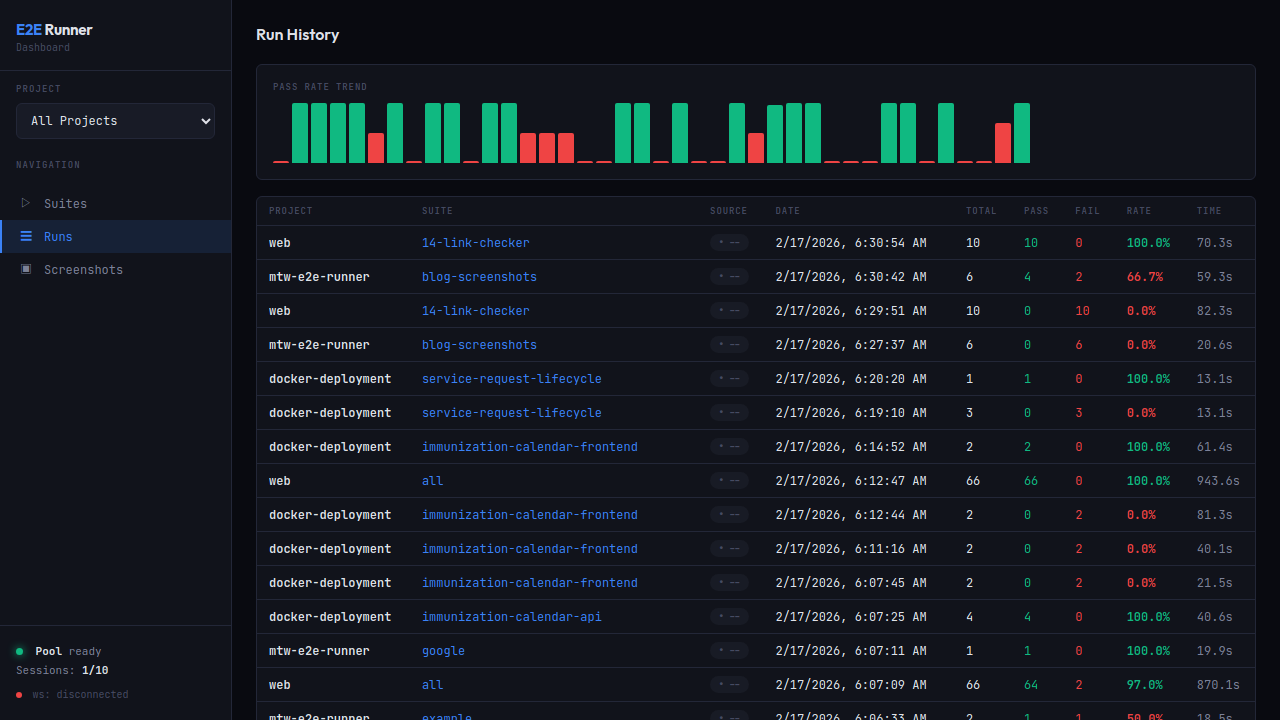 Runs view: pass rate trend chart and execution history table across all projects.
Run Detail
Expand any run to see individual tests with pass/fail badges, durations, screenshots with clickable hash badges, and formatted console errors.
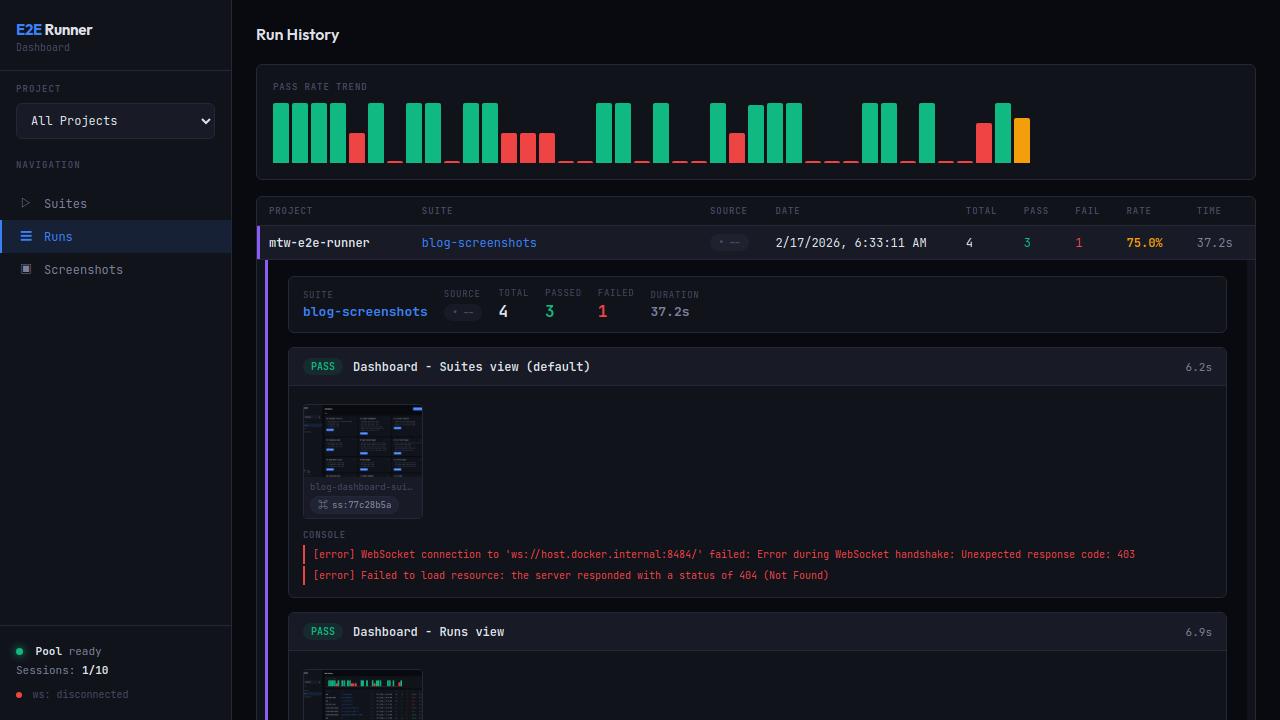 Run detail: expanded test with PASS badge, screenshot thumbnail with clickable hash badge
 ss:77c28b5a.
Screenshot Gallery
A grid gallery of all screenshots captured across test runs, organized by project.
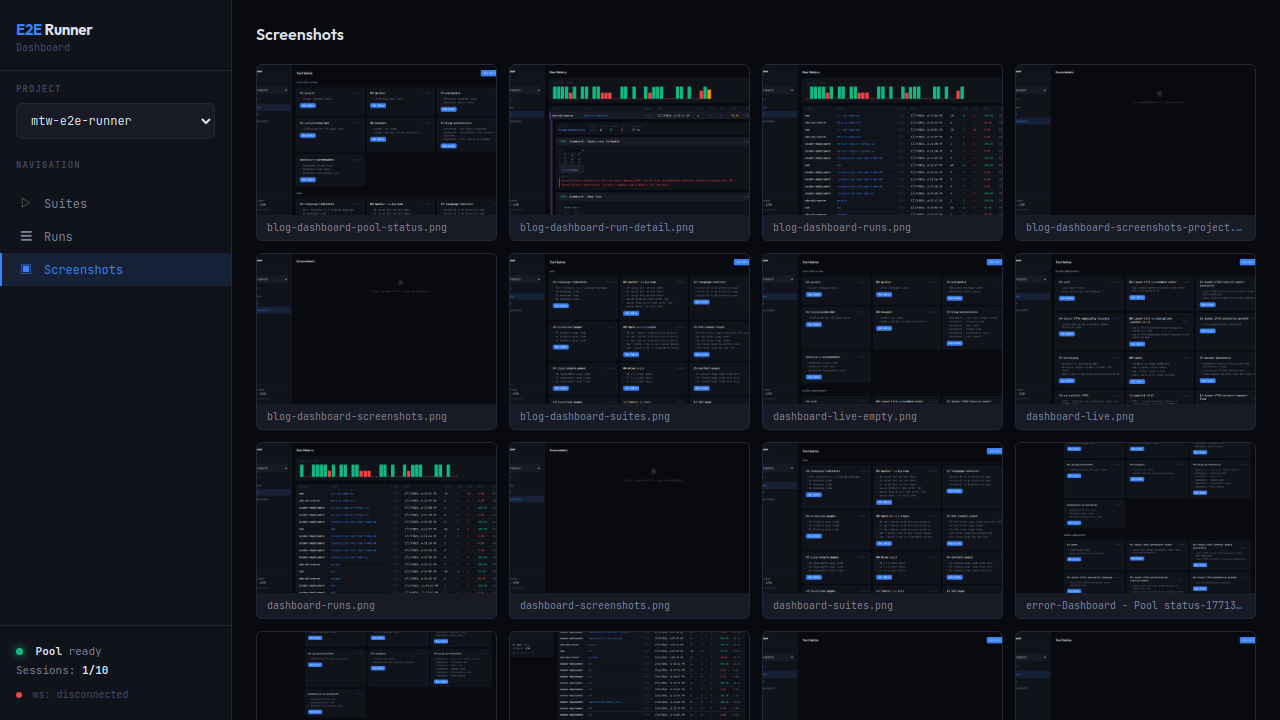 Screenshots view: visual gallery of all captures for the selected project.
Multi-Project Support
The dashboard handles multiple projects simultaneously. Each project is identified by its working directory (cwd) with a configurable display name.
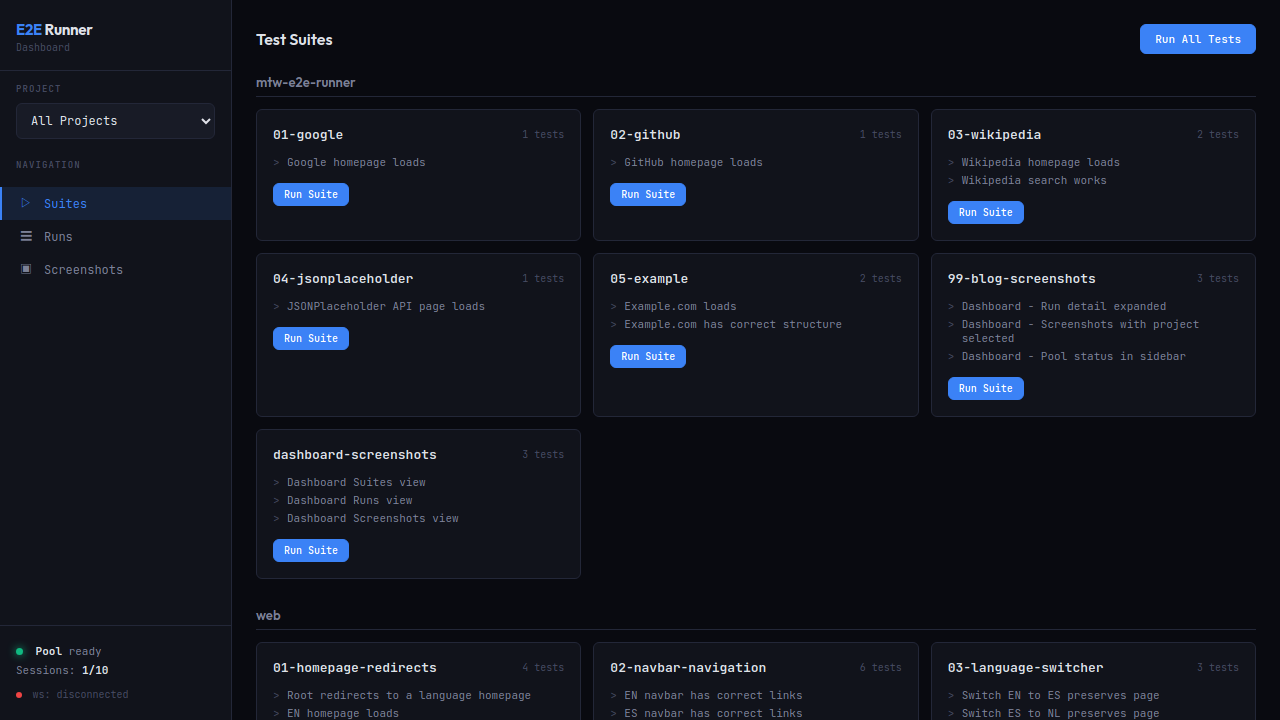 Multi-project: suites from different projects in separate sections, pool status in the footer.
# Via CLI flag
e2e-runner dashboard --project-name "My App"

# Via environment variable
PROJECT_NAME="My App" e2e-runner dashboard

# Via e2e-runner.config.json
{ "projectName": "My App" }
The dashboard is also available as MCP tools: e2e_dashboard_start and e2e_dashboard_stop.
Issue-to-Test: From Bug Report to E2E Test Automatically
Convert GitHub and GitLab issues into executable E2E tests. Supports github.com and GitLab (including self-hosted), detecting the provider automatically from the URL.
Two modes of operation:
Prompt Mode (default, no API key required)
The MCP tool e2e_issue fetches the issue details (title, body, labels, comments) and returns a structured prompt. Claude Code uses that prompt to create tests with e2e_create_test and run them with e2e_run. The flow is entirely AI-orchestrated.
Verify Mode (requires ANTHROPIC_API_KEY)
Calls the Claude API directly to generate tests, executes them automatically, and reports whether the bug is confirmed or not reproducible. The logic: generated tests verify the correct behavior, so if they fail = bug confirmed, if they pass = not reproducible.
# Show issue details
e2e-runner issue https://github.com/org/repo/issues/42

# Generate test file via Claude API
e2e-runner issue https://github.com/org/repo/issues/42 --generate

# Generate + execute + report bug status
e2e-runner issue https://github.com/org/repo/issues/42 --verify

# Output prompt as JSON (for piping)
e2e-runner issue https://github.com/org/repo/issues/42 --prompt
Authentication: Uses gh CLI for GitHub and glab CLI for GitLab. All external commands use execFileSync (no shell injection). No new dependencies added.
Screenshot Hashes: From Dashboard to Claude Code in One Click
Every screenshot captured during a test run — whether from a screenshot action or an automatic error capture — now gets a short, deterministic hash identifier like ss:a3f2b1c9.
These hashes appear as clickable badges throughout the dashboard. Click the badge, and it copies ss:a3f2b1c9 to your clipboard.
Then paste it into Claude Code. The e2e_screenshot MCP tool resolves the hash, reads the file from disk, and returns the actual image — no file paths, no guessing.
# In Claude Code, just paste the hash
ss:a3f2b1c9
# → Claude sees the screenshot and can reason about it
How it works: The hash is the first 8 hex characters of the SHA-256 of the file’s absolute path. Computed identically on server (Node crypto) and browser (Web Crypto API), so hashes appear in the Live view before the run even finishes writing to SQLite.
When saveRun() writes results to the database, it registers every screenshot hash in the screenshot_hashes table within the same transaction. The run detail API includes a screenshotHashes map per test, and /api/screenshot-hash/:hash serves images by hash.
This closes the loop between visual test output and AI-assisted debugging.
SQLite Persistence
Every test run is persisted to a centralized SQLite database at ~/.e2e-runner/dashboard.db. WAL mode for concurrent access, dual-write to both filesystem (JSON) and SQLite for backwards compatibility.
Tables: projects, runs, test_results, screenshot_hashes with foreign keys and indices.
REST API:
GET /api/db/projects— list all registered projectsGET /api/db/projects/:id/runs— runs for a specific projectGET /api/db/runs/:id— full detail of a single run
Pool-Aware Queue
Before v1.1.0, launching more tests than the Chrome pool could handle caused connections to pile up, leading to memory pressure and SIGKILL’d Chrome processes.
Now, each worker checks the pool’s /pressure endpoint before opening a connection. If the pool is at capacity, the worker waits (polling every 2s, up to 60s) until a slot frees up.
Live Progress Events
Structured events via an onProgress callback system:
| Event | When |
|---|---|
run:start | Run begins (total tests, concurrency, project) |
test:start | Individual test starts |
test:action | Each action completes (success/error, duration) |
test:retry | Failed test is being retried |
test:complete | Test finishes with final result |
run:complete | Summary with passed/failed counts |
Events power the dashboard’s real-time updates via WebSocket, with a buffer for reconnections.
New navigate Action
For SPAs where client-side routing doesn’t trigger traditional page load events:
{
  "type": "navigate",
  "value": "/dashboard/settings"
}
Uses a race pattern with a 5-second timeout. Supports absolute URLs and relative paths.
MCP Server: 8 Tools via stdio + HTTP
The MCP integration got a significant upgrade. Tool definitions are in a shared module, and the dashboard exposes the same tools via Streamable HTTP at /mcp.
| Tool | Description |
|---|---|
e2e_run | Run tests (all, suite, or file) |
e2e_list | List available test suites |
e2e_create_test | Create a new test file |
e2e_pool_status | Check Chrome pool status |
e2e_screenshot | Retrieve screenshot by hash |
e2e_dashboard_start | Start the dashboard |
e2e_dashboard_stop | Stop the dashboard |
e2e_issue | Convert issue to E2E test |
Quick Start
# One-liner: installs, scaffolds, starts pool, runs sample tests
curl -fsSL https://raw.githubusercontent.com/fastslack/mtw-e2e-runner/main/scripts/quickstart.sh | bash
Or step by step:
npm install -g @matware/e2e-runner
e2e-runner run --all
e2e-runner dashboard
Breaking Changes
None. Everything is backwards compatible. The only new runtime dependency is better-sqlite3.
Check the GitHub repo for full documentation and the npm package for installation details.
@matware/e2e-runner remains JSON-driven, zero-config by default, and now gives you a real-time dashboard, automatic bug verification from issues, and AI-powered screenshot debugging — all with first-class Claude Code integration via MCP.